Blog

How Does Visual Take Convert a Screenplay into a Shot List?

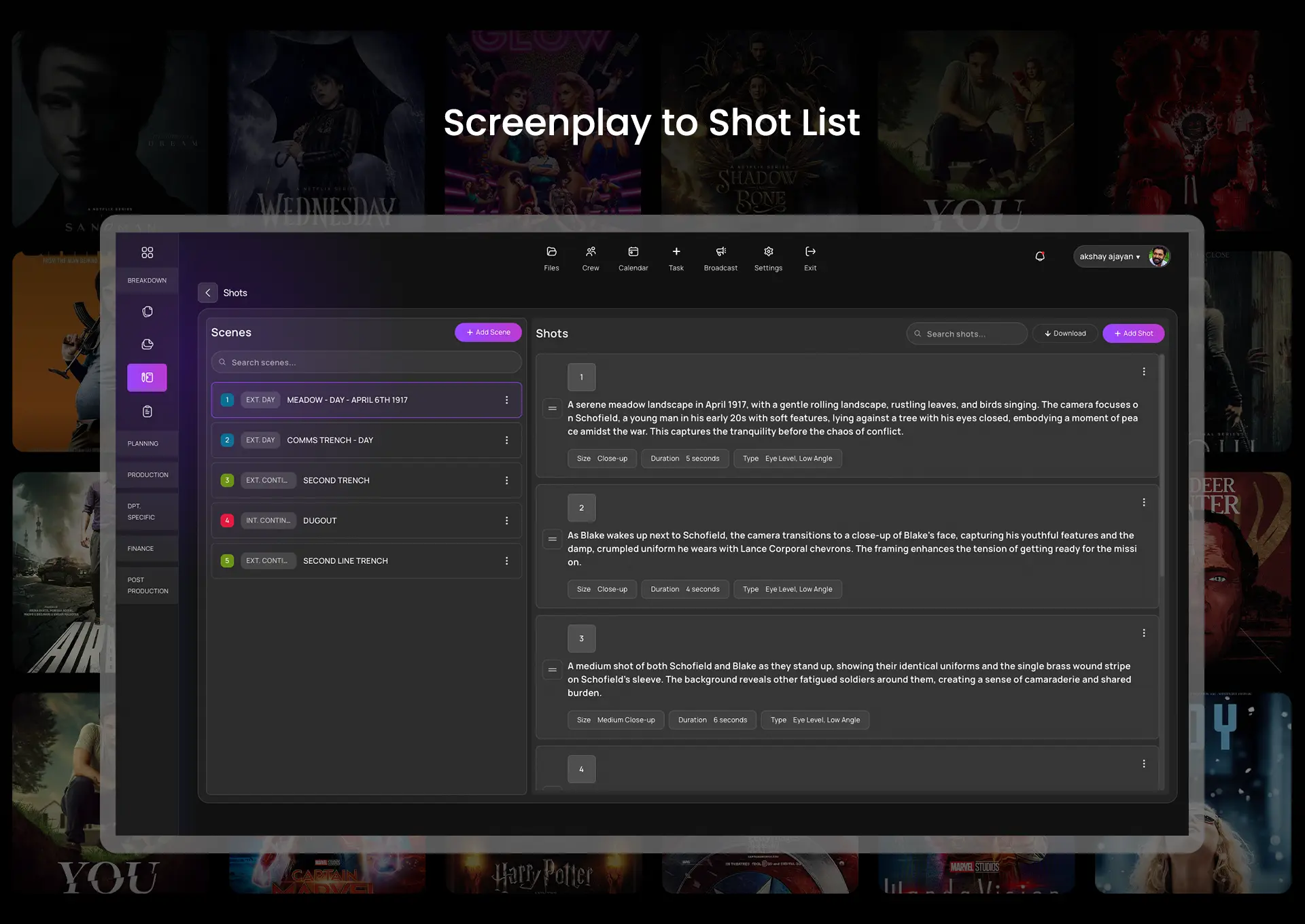
Visual Take parses every scene in your screenplay and generates a structured shot list automatically. The shot list includes scene number, location type (interior or exterior), time of day, cast members present, props required, suggested camera angle, lens recommendation, and estimated shot duration. This output is mandatory for any production where the DOP and director are briefing a crew with no prior project familiarity.

The platform's visual script breakdown software tags each screenplay element — character, prop, costume, SFX, VFX, and special equipment — by scene. The tagged breakdown feeds directly into the shot list. No manual data transfer is required between breakdown and shot list generation.

Visual Take's AI-generated shot list planner assigns shot types by scene mood and narrative function. Dialogue-heavy two-person scenes receive over-the-shoulder and close-up coverage suggestions. Action sequences receive wide establishing and tracking shot recommendations. Kerala-based DOPs working on Malayalam new wave projects use this function to build their camera plan before the tech scout.

AI-powered screenplay to shot list dashboard showing scenes, shot details, camera suggestions, and duration planning for film production.

How Does Visual Take Build a Shooting Schedule from a Shot List?

Visual Take's production scheduling engine builds an optimised shooting schedule directly from the confirmed shot list and location breakdown. The scheduling engine groups scenes by location, cast availability, and equipment requirements. Scheduling by script page order is the most common and most expensive pre-production mistake — Visual Take's engine prevents it by default.

The platform's optimised filming schedule function minimises location travel between shoot days. All scenes requiring the same lead cast in the same location are batched into contiguous shoot blocks. A ₹6 lakh Tamil indie short with seven shooting days reduces to five days through location-optimised scheduling. Two saved shoot days eliminate ₹40,000–₹70,000 in crew day rates, camera rental from vendors like Chennai's Cine Light House, and catering costs.

Smart schedule optimization is defined as mandatory for productions where the director, producer, and first AD are the same person — a standard structure in Indian indie short film production.

What Does Visual Take Generate for Call Sheets and Crew Coordination?

Visual Take generates a complete daily call sheet from the locked shooting schedule automatically. Each call sheet includes shoot date, location address with GPS pin, call times by department, scene numbers, cast requirements, props list, equipment list, and emergency contacts. The AI-generated call sheet creator eliminates manual call sheet preparation entirely.

Call sheets are distributed to the full crew from inside Visual Take's production dashboard. Department heads — DOP, art director, sound recordist, costume designer — receive role-specific call sheet views that show only their department's requirements for that shoot day. This function replaces WhatsApp broadcast coordination, which is defined as an untracked, unverifiable communication method unsuitable for professional production documentation.

Malayalam productions submitting to the Kerala State Film Development Corporation and Tamil productions applying for NFDC short film grants require documented production records. Visual Take's call sheet archive serves as a complete production log for grant documentation purposes.


How Does Visual Take Support Post-Production Handoff from the Shot List?

Visual Take's post-production module connects the shot list to the editorial workflow. The platform's automated scene breakdown tool generates a take log template for every shot in the list. Editors on Tamil and Malayalam indie projects receive a pre-structured log that matches shot numbers, scene descriptions, and camera notes from the original shot list.

The take log eliminates manual syncing between on-set script notes and the editing timeline. Post-production teams at facilities like Chennai's Pixel Post and Kochi's Digital Studio use Visual Take's handoff documents to begin assembly cuts on Day 1 of post without a production meeting.

AI-enhanced post-production planning inside Visual Take flags VFX-dependent shots in the breakdown and tags them for dedicated post-production budgeting. A Visual Take project file on a ₹10 lakh Kerala short with three VFX shots produces a separate VFX cost estimate at the breakdown stage — before post-production begins.

What Is the Correct Workflow Sequence Inside Visual Take?

The correct script-to-shot-list workflow inside Visual Take follows six steps. This sequence is mandatory for productions targeting OTT platforms including Mubi India, Amazon miniTV, Sony LIV Shorts, and ZEE5 Originals.

Step one is screenplay upload and automated formatting. Step two is AI-powered script readiness check. Step three is automated scene breakdown and element tagging. Step four is shot list generation with camera and lens recommendations. Step five is location evaluation and tech scout checklist generation. Step six is schedule optimisation, call sheet creation, and post-production handoff documentation.

Visual Take executes all six steps inside a single platform. A filmmaker working on a ₹4 lakh Karnataka-set drama completes this entire sequence in one working day. The same filmmaker using Celtx for breakdown, Google Sheets for scheduling, and manual WhatsApp for call sheets requires four to six days for the same output — and produces an unlinked, error-prone document set.

Filmmaking starts with vision. Visual Take ensures the workflow between that vision and the shoot floor is automatic, accurate, and production-ready.

VisualTake film production banner with camera and spotlight